
Low Battery Generator Auto Start Module: Application Notes.
The Be1 generator controller is an effective, proven solution to prevent low battery conditions on your generator. It interfaces with your auto start controller. As an option, you can connect two relays and make your own Auto Start Relay.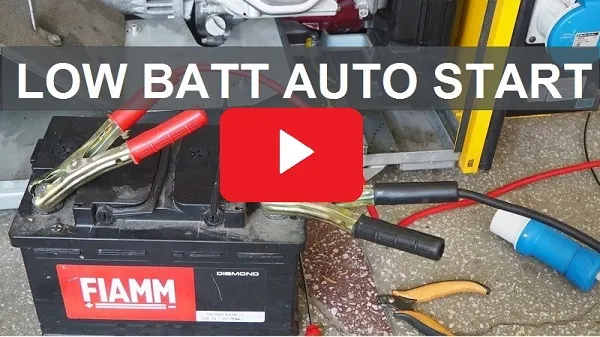 When the battery rises above the HIGH BATTERY VOLTAGE threshold (2), the delay timer (4) will start to count. When the timer (4) expires, the engine will automatically stop.
Purchase the Be1 Generator Controller
Low Battery Auto Start Controller Recommended Connection.
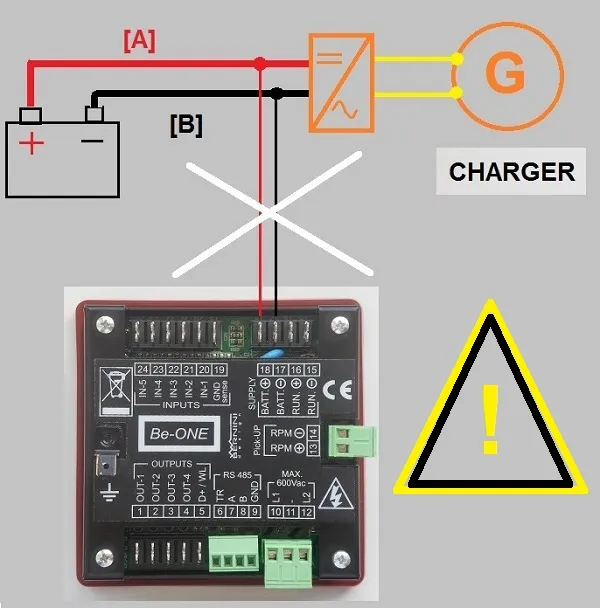
Do not connect the device as indicated in the following picture.
When the charger delivers a current, the drop of voltage on wires [A] and [B] generates erratic battery voltage measurements. You can experience a 1V of error or more.
Connecting the correct point for the measurement is vital.
This is the correct way to connect the Low Battery Auto Start Module. The measurement cables are directly connected to the battery. This connection will allow a precise battery voltage measurement.
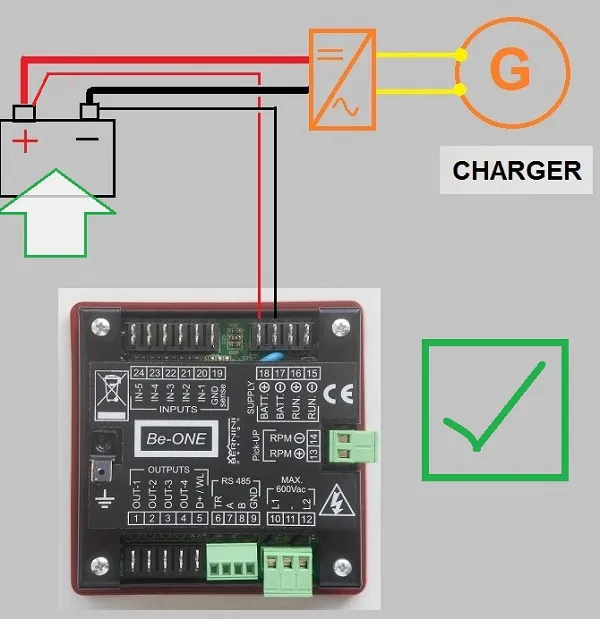
To improve precision, use 1.5 sq. mm for the connections.
How to Set Up the Battery Generator Auto Start Module?
To make the Low Battery start working, use a REMOTE START input. The Be1 only monitors this input in AUTO mode of operation. OUTPUT nr. 4 (terminal #4) and INPUT nr. 4 (terminal #23) are utilised in this example.
Hardware Setup
- Program the parameters P0 and P1 (see table 7.00) to add a delay in starting and stopping the engine. Default settings are 5 secs. Longer timing will avoid unstable operations.
- Verify that OUTPUT4 is not being used for any other purpose and that INPUT4 has the option [12] (by default).
- Make sure that the polarity of the INPUT4 contact is [n.o.] (that is the default).
- Enter the programming mode to set the output 4 with the option [15] (the default is [4]).
- Connect the output “4” (terminal#4) to the input “4 “ (terminal#23).
Software Setup
- Remove the DC supply. Push and hold the button [0], and at the same time turn the supply on. Hold the button [0] until the message [Lobt] is displayed. Release the button [0].
- To adjust the low battery threshold [Lobt], push and hold [?]. Push [AUTO] to increase or [ I ] to decrease the setting. Release the button [?].
- To select the [Hibt] threshold, push the button [→]. To adjust the [Hibt] setting, push and hold [?]. Push [AUTO] to increase or [ I ] to decrease the setting. Release the button [?].
- Save the settings by pushing and holding together the buttons [ACK] and [→] for about 5 seconds.
The Be1 starts the engine when the battery voltage falls below the [Lobt] threshold after expiring the [P0] delay. The Be1 stops the engine when the battery voltage rises above the [Hibt] threshold after expiring the [P1] delay.
Bernini Design Srl
Industrial Park
46035 Ostiglia (Italy)
bernini@bernini-design.com
+39 335 70 77 148